Artemis Logo

Artemis Logo
Artemis ABA
September
Product Update

Major Updates
- Anecdotal Notes:
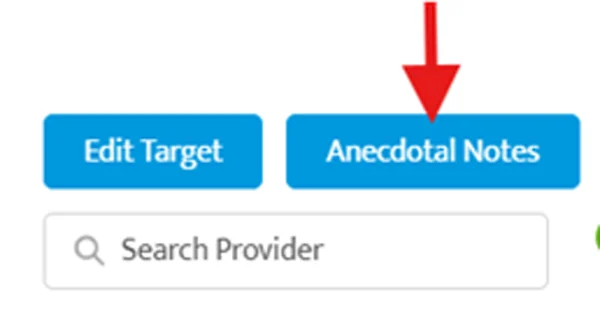
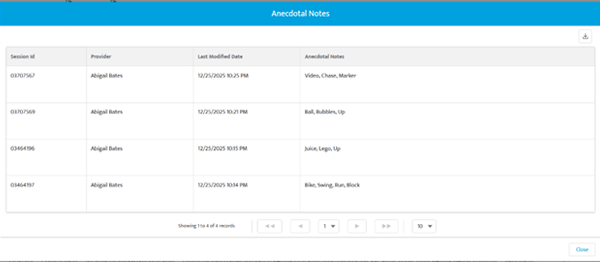
- Target-level anecdotal notes from sessions are now visible in the Results page under the Anecdotal Notes button. You can also download them directly.
- Technicians can add notes via Data Collection sessions, while Clinical Supervisors can view them on the target details page.
- Simply click the target on the Results page, then select Anecdotal Notes.
Additional Changes
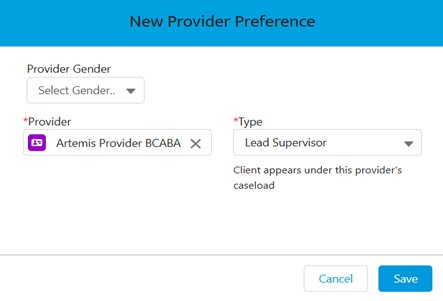
- Lead Supervisor: When setting up provider preferences in Client 360, you’ll now see a Lead Supervisor option. This replaces the previous Preferred Provider type.
- How it works:
- Navigate to Client 360 → Provider Preferences tab
- Click New Provider
- Select Lead Supervisor
- Helpful to know:
- You can assign one Lead Supervisor per client
- This designation is used for caseload tracking in the Clinical Director Dashboard
- In the Client List, the Lead Supervisor will appear first and in bold, with any additional Supervising providers listed underneath
- This update helps ensure supervision roles are clear and sets the foundation for new reporting tools coming in the new year.

- Refreshing the CIP: When refreshing in the Client Intervention Plan, we’ll keep you on the same screen to prevent disruption in workflows.
Platform Improvements
- Session Notes:
- Improved visibility of mandatory field icons for Direct Therapy notes.
- Resolved view and edit issues for Addendum Notes.
- Ensured Insurance ID displays consistently in session notes.
- My Incomplete Session Notes (Session Module):
- Ensured completed fields are appearing correctly in the My Incomplete screen.
- Improved warning messages and display of client information.
- Created smoother experience and easier navigation between notes when signing.
- You can now switch the Missing Notes view on and off more easily.
- Client 360:
- Resolved an inconsistent issue selecting a provider’s name when adding them to the Provider Preferences list.
- Revised confirmation message when adding a self-pay service in Client 360.
- Client Forms:
- Improved the appearance of Client Form PDFs when signatures are incomplete.
- Billing:
- Improved the status filter functionality in the Advanced Merge screen.
- Refined filters in the Billing module for better usability.
- Client Intervention Plan:
- Updated the Results Page so the grid shows information consistently based on the date range selected.
- The Exclude from Graph option now correctly removes 0 data points from graphs.
- Reports:
- Improved the downloaded Payor Mix report by updating Provider and Location column headers.
- Fixed billable vs. non-billable hours reporting on the Week Planner views to align with scheduled hours.
- Appointments:
- Updated confirmation messages and error messages to make scheduling clearer and smoother.
Coming Soon
- Bulk Download of Session Notes: Soon, you’ll be able to choose a date range and download multiple session notes at once, making it easier to save and share notes for reviews. This feature will save you time and simplify your process, all with just a few clicks. Stay tuned!
- Clinical Director Dashboard: A new dashboard view will be available in the Home module under Dashboards.
- Provides key KPIs for overseeing clinical metrics across locations, including caseloads, billable hours, caseload tracker, cancellations, and client service history.
Learn More
- User Access Management: Get the full details on managing users and their access levels Manage user access in Artemis ABA!
Contact Us
Join the Live Support Room — to reach an Artemis team member at any time, 7 am - 7 pm CST.
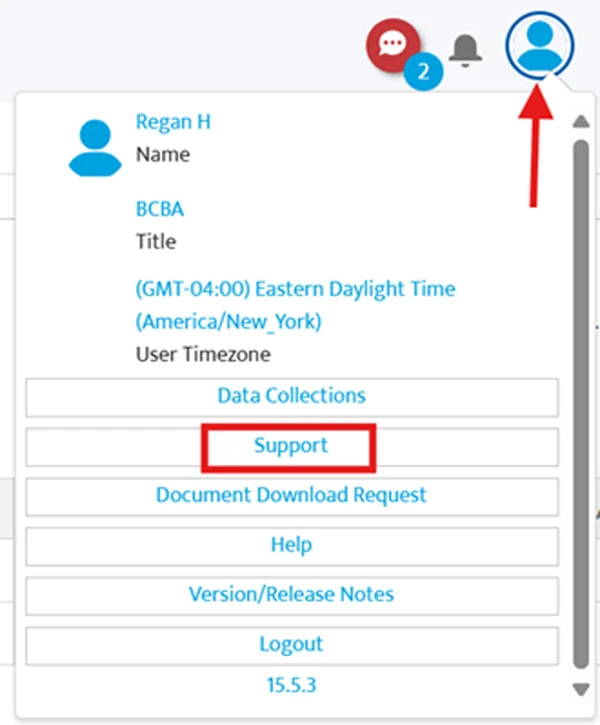
You can also contact us at customersupportticket@artemisaba.com — we're here to help!
We hope these updates make your practice operations smoother and more efficient! If you have any questions or need assistance, don’t hesitate to reach out to our support team.
Thanks for being a part of the Artemis family! We can’t wait for you to explore these new features. Happy practicing!🌟


Artemis ABA Inc., One Hanover, 16633 N Dallas Pkwy, Suite 456, Dallas, TX 75001, US, (469) 242-6053
Unsubscribe Manage preferences