
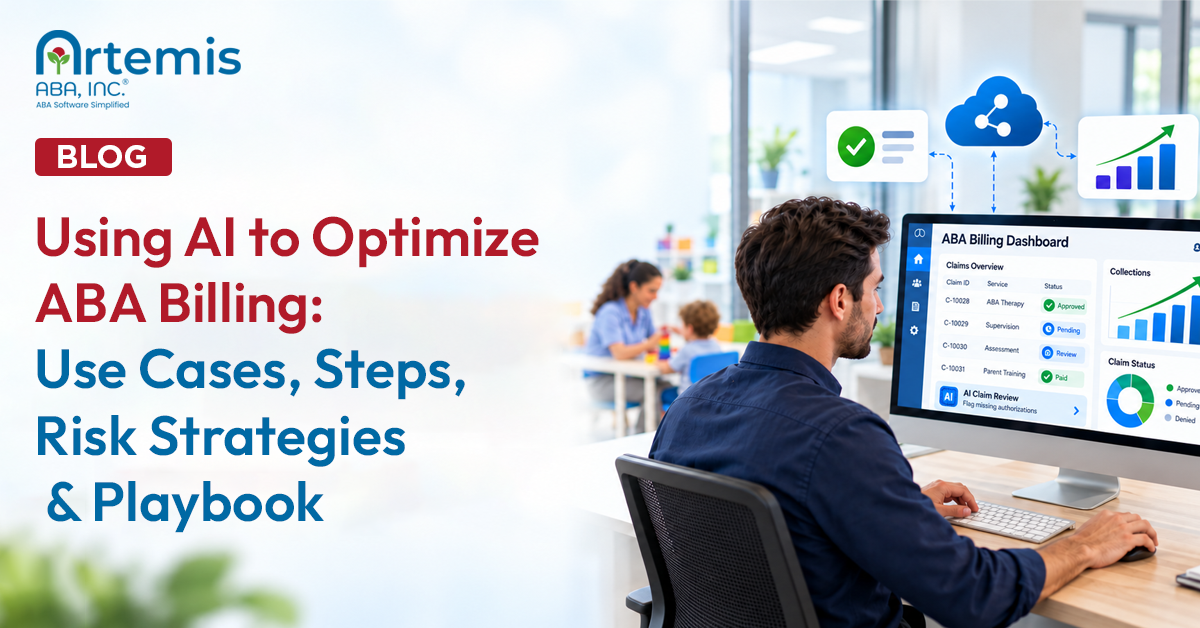
Using AI to Optimize ABA Billing: Use Cases, Steps, Risk Strategies & Playbook

Inside this article:

AI can reduce ABA billing denials and speed reimbursement, but only when clinics let rule-based automation run autonomously and keep generative output under human review. Here are the AI billing core use cases, steps, risks, and a free playbook.
Core Use Cases of AI for ABA Billing
AI supports ABA billing in eight core use cases: eligibility checks, claim scrubbing, code and modifier validation, authorization tracking, session note auditing, denial sorting, appeal drafting, and payment posting. Rules-based jobs can run automatically, while generative jobs produce drafts for human review before anything reaches a payer.
The need is real. In the State of Claims 2025 survey from Experian Health, 41% of healthcare providers said more than one in ten of their claims are denied, up from 30% in 2022, and half named missing or inaccurate claim data as a top driver of denials. ABA billing concentrates those risks: a small set of CPT codes (97151 through 97158), provider-credential modifiers, unit-based authorizations, and payer rules that differ by state and plan.
Here is what each use case does for an ABA practice:
- Eligibility checks. AI-driven verification runs coverage checks automatically before sessions, not just at intake. It catches lapsed plans, changed benefits, and coordination-of-benefits issues before a claim goes out against inactive coverage.
- Claim scrubbing. Before submission, software checks each claim against payer-specific rules: required fields, place-of-service codes, timely filing windows, and duplicate detection for multiple same-day sessions.
- Code and modifier validation. The system confirms that the CPT code matches the service delivered and the provider's credential, including modifiers such as HO (master's level), HN (bachelor's level), and HM (less than bachelor's level), and checks units against authorized limits and payer edits such as National Correct Coding Initiative (NCCI) edits and Medically Unlikely Edits (MUEs).
- Authorization tracking. AI monitors every active authorization for expiration dates, remaining units, and provider matches, flags upcoming renewals, and blocks claims that would exceed authorized units.
- Session note auditing. Software compares session notes against the claim before submission: does the documented time support the billed units, does the note support the code, is a required signature missing? This is where billing quality connects back to ABA data collection and documentation practices.
- Denial sorting. When denials come back, AI categorizes them by root cause (eligibility, authorization, coding, documentation, timely filing) so your team can fix the pattern rather than rework one claim at a time.
- Appeal drafting. Generative AI can produce a first draft of an appeal letter that references the denial reason and the payer's own policy. This is a draft only. A qualified human edits and approves it before sending.
- Payment posting and underpayment review. AI reconciles electronic remittance advice (ERA, also called the 835 transaction) against submitted claims, posts payments automatically, and flags payments received below contracted rates.
[fs-toc-omit]Full AI Automation vs. Human Approval for ABA Billing
The split between AI automation and human approval for ABA billing is simple. Rules-based jobs can run autonomously, generative jobs need a reviewer, and clinical judgment stays with people. Ask yourself: Does the job have a correct answer that a rule can check, or does it produce something new?

“What surprised me most about using AI in billing wasn't the speed, it was the catch rate,” says Senthil Sadhasivan, Senior Product Manager at Artemis ABA. “It flagged mismatches between the authorization, the CPT and the modifier before the claim ever left our system, the kind of thing a biller only finds out after a denial comes back. So AI doesn't replace billing expertise, but it lets the team spend the time on the exceptions that actually need judgment.”
Here’s the breakdown:
- Runs on its own. Eligibility inquiries, unit math against the authorization, modifier checks against credentials, claim scrubbing against payer edits, claim status inquiries, and payment posting from electronic remittance advice. Each has a defined correct output. The tool either produces it or raises an exception for a person to review.
- Needs a human check before it counts. Appeal drafts, note audit flags, authorization request packets, any claim correction that changes a code or a unit count, and any AI-generated text that will be sent to a payer or placed in a record. The tool drafts or flags. A named person approves.
- Stays fully human. Deciding what service was delivered and whether it was medically necessary, writing the clinical content of the note, choosing whether to appeal or write off a claim, responding to a payer audit, and signing off on what gets billed. No tool takes these jobs. A person is responsible for every claim that leaves the clinic. That is not a design preference, and the section on risks covers what the BACB Ethics Code says about it.

"AI can absolutely automate repetitive tasks, improve productivity, and reduce manual effort," says Venuprakash J, Director of RCM at Plutus Health Inc. "However, I haven't seen a system that can independently handle every billing scenario without oversight, as every payer behaves differently, documentation changes, authorization requirements change, and denials often require human judgment.”
How to Implement AI to Optimize ABA Billing, Step by Step
Implementing AI in ABA billing takes six steps: baseline your billing, choose the tool type that fits your biggest problem, meet BAA and PHI requirements, run a narrow pilot, set up the review workflow, and scale in stages. Start with one job and one payer, and expand on evidence.
Here are the detailed steps to implement AI to optimize ABA billing:
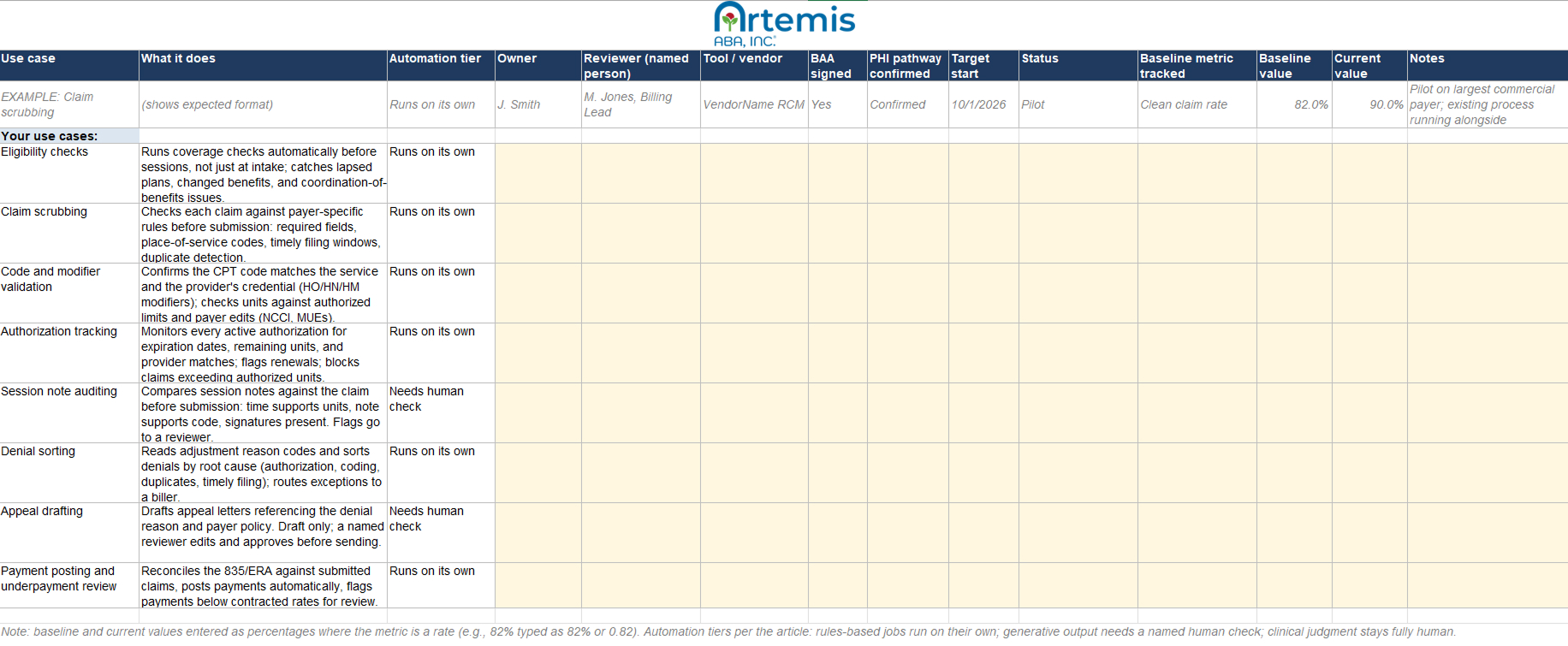
AI Playbook for ABA Billing Optimization
The AI playbook for ABA billing optimization is a free Google Sheet that turns this article into a working project plan. It lists each AI billing use case, the six implementation steps, the compliance checkpoints to clear, and progress tracking fields your team can update as you roll out.
Use it to assign owners, set target dates, and record baseline and follow-up metrics for each use case. The compliance column keeps the non-negotiables visible: BAA signed, PHI pathway confirmed, reviewer named. When a payer or auditor asks how you use AI in billing, the completed playbook is your documentation.
Types of AI Software for ABA Billing Optimization
AI software for ABA billing comes in three types you can buy: rules-based claim scrubbers, generative AI documentation assistants, and ABA practice management platforms with AI built in. A fourth kind, the audit AI payers run on your claims, is not for sale but shapes how you use the rest.
Rules-Based Claim Scrubbers and RCM Automation
These tools apply payer-specific edit libraries to every claim before it goes out, flagging or blocking anything that fails: a missing field, a modifier that doesn't match the credential, or units over the authorization. The same claim always gets the same answer, making it the most predictable type to run unattended.
The catch is that a scrubber is only as good as its rules. A library built for general medical billing misses ABA codes, modifiers, and unit logic, so confirm the vendor maintains ABA-specific edits. Many scrubbers also include predictive denial analytics, a machine learning feature that scores which claims are likely to be denied; it helps set priorities, but it learns your history, mistakes included. You might start here if your denials cluster on eligibility, authorization, or coding errors.
Generative AI Documentation Assistants
These tools write appeal letters, summaries, and payer correspondence drafted from the denial, the note, and the policy you feed them. They are the fastest way to clear an appeals backlog, but also the riskiest type on this list.
Two rules are necessary to keep them safe. First, assume a generative tool cannot touch PHI until the vendor has signed a BAA and excluded your data from training in writing; consumer tiers of ChatGPT and Claude offer a BAA. Second, generative tools produce plausible text, not verified facts, so a named reviewer approves every draft before it reaches a payer. A draft that overstates a service reads as upcoding, no matter how polished it sounds.
The newest entrants promise fully autonomous, end-to-end billing agents. Treat them as exactly that, emerging, and hold them to the same two rules.
ABA Practice Management Platforms With Built-In AI
These platforms, such as Artemis ABA, run scrubbing, note auditing, authorization tracking, and payment posting directly on the scheduling, session, and claims data the platform already holds. One data environment means one BAA and one audit trail covering the whole billing pathway, with no data re-entry between point tools.
Choose this type when your denial data points to more than one problem. The standard to hold any platform to is the use case list at the top of this article: the more of those jobs its AI handles, the fewer tools you have to stitch together and police.
Payer-Side Audit AI
Payers run their own AI to review submitted claims at scale, looking for anomalies, templated documentation, and coding patterns. You do not buy this type; you are subject to it. It changes how you use the other three: assume every claim and note will be machine-read, and make consistency between documentation and billing the pattern your practice shows.
AI Billing Tool Types, How the AI Works, and Considerations
[fs-toc-omit]Using AI-Optimized Billing Within ABA Revenue Cycle Management
AI fits into every stage of the ABA revenue cycle: eligibility verification at intake, authorization tracking during treatment, charge capture and claim scrubbing at submission, payment posting and underpayment review after adjudication, and denial analysis across accounts receivable. Connected, these stages form one continuous automated flow.
Follow one client through the cycle. Before intake finishes, automated eligibility verification confirms active coverage and ABA benefits, and it re-checks before sessions so a mid-year plan change never surprises you. As treatment begins, the authorization tracker loads approved units and dates, counts down as sessions occur, and flags the renewal window before units run out. When a session is completed, charge capture pulls the session data, and the scrubber validates the code, modifier, units, provider credential, and authorization match before the claim leaves for the clearinghouse. After adjudication, ERA posting reconciles the payment, and anything below the contracted rate goes to an underpayment queue. Denials, when they happen, are categorized by root cause and fed back into the scrubber rules, so the same denial gets harder to repeat. Across accounts receivable, aging claims are flagged automatically against expected payment timelines instead of waiting for a monthly report.
The industry-level math explains why this compounds. The 2025 CAQH Index, an annual benchmark of healthcare administrative automation, found that automation helped the healthcare industry avoid $258 billion in administrative spending in a single year. ABA practices, with high session volumes per client, sit on the favorable end of that math: every automated transaction repeats dozens of times per client each year.
Optimization Strategies for AI in ABA Billing
To optimize AI billing results over time, refine payer-specific rules using your own denial data, expand automation gradually as accuracy proves out, track clean claim rate, denial rate, and days in accounts receivable, and fix recurring error patterns at the source rather than reworking individual claims.
- Refine payer rules from your denial data. Generic edits catch generic errors. Your remittance history shows which payer wants 97153 billed under the supervising BCBA, which one requires a specific modifier for same-day sessions, and which one denies without a distinct-encounter indicator. Review denial patterns monthly and turn each confirmed pattern into a scrubber rule.
- Expand automation as trust builds. Start with the tiers from the automation-versus-approval framework above, then deliberately promote jobs. A step earns fuller automation after it runs clean for a defined period, such as 90 days without a system-caused denial. Keep a log of what was promoted and when, so you can trace any new error pattern back to a change.
- Track the metrics that show it is working. Four numbers tell the story: clean claim rate, denial rate, first-pass resolution rate, and days in accounts receivable. Pull them monthly against your pre-implementation baseline. If a metric moves the wrong way, check what changed: a payer policy update, a new staff workflow, or an automation you promoted too early.
- Fix recurring error patterns, not individual claims. Every denial your team reworks by hand should end in a question: what upstream rule, template, or workflow change would have prevented it? A practice that answers that question consistently converts denial management from a cost center into the engine that improves the whole system.
- Keep rules current. Payer policies, NCCI edits, and MUE values change on regular cycles. Assign someone to confirm quarterly that your tool's edit libraries have been updated, and spot-check high-volume codes after each update.
[fs-toc-omit]Overcoming Risks of Using AI in ABA Billing
The main risks of using AI in ABA billing are HIPAA violations from putting PHI into tools without a business associate agreement, upcoding and templated documentation that trigger payer audits, and loss of confidentiality over sensitive data.
Each risk of using AI in ABA billing has a specific, manageable fix:
- Risk: PHI in tools without a BAA. Session notes, treatment plans, diagnosis codes, and billing records are all protected health information. Entering PHI into a consumer AI tool without a signed business associate agreement violates HIPAA, regardless of how useful the output is. The fix: use only tools operating under a signed BAA, with your data excluded from model training, and make "no PHI in public tools" a written policy with training to back it.
- Risk: assuming de-identification makes data safe. Stripping a name is not de-identification. HIPAA recognizes two de-identification methods, expert determination and the Safe Harbor removal of eighteen identifier categories, and casual redaction meets neither. In a small ABA caseload, a combination of behavior patterns, session frequency, location, and dates can still identify a client. The fix: treat data as PHI unless it has been de-identified to the HIPAA standard, and default to the BAA-covered pathway.
- Risk: upcoding and templated documentation. Generative tools optimize for plausible language, and plausible language can overstate a service. A draft that describes technician-delivered treatment (97153) in language that implies protocol modification by the BCBA (97155) is not a style problem; it is a potential upcoding problem. Repetitive, templated medical necessity language creates its own exposure, because payers increasingly use AI to flag documentation that looks machine-generated or inconsistent with the claim. The fix: human review of every code selection and every piece of clinical language, with documentation individualized to the client.
- Risk: unclear accountability. No vendor contract transfers your billing responsibility. Standard 2.06 of the Ethics Code for Behavior Analysts requires accurate identification of services on all bills and reimbursement requests and timely correction of discovered inaccuracies, and standards 2.03 and 2.05 require protecting confidential information and complying with documentation storage requirements. The fix: name a human approver for every automated workflow and document how AI participates in your billing, so the accountability chain is visible before anyone asks.
- Risk: losing control of sensitive data. Whether your practice keeps control of billing data depends on the vendor's data terms, not on how careful your staff is. In February 2026, two federal courts split on the question. In United States v. Heppner, the Southern District of New York held that a criminal defendant's exchanges with a publicly available version of Anthropic's Claude carried neither attorney-client privilege nor work product protection, resting in part on the tool's privacy policy, which allowed the vendor to collect user inputs and disclose them to third parties. That same month, in Warner v. Gilbarco, a Michigan federal court reached the opposite result on work product, calling generative AI programs "tools, not persons," and never examined the platform's terms at all. The law is unsettled. The billing lesson is not. A session note, a medical necessity justification, or an appeal draft entering a tool with those terms is information your practice no longer controls. The fix: enterprise tools, a signed BAA, and contract terms that keep your data yours.
[fs-toc-omit]Best Practices for AI in ABA Billing
Best practices for AI in ABA billing come down to five rules: sign a business associate agreement before any PHI touches a tool, automate rules-based work first, keep a named human approver for generative output, feed denial data back into your rules, and document how you use AI.
Sequence matters as much as the rules themselves. Practices that start with eligibility verification and claim scrubbing build trust on jobs with verifiable right answers, then add generative drafting once the review workflow is in place. Practices that start with generative documentation, because it demos well, take on the highest-risk category first with no guardrails in place.
"I have seen AI-generated appeals or summaries that looked professional but didn't accurately reflect the actual denial reason," says Venuprakash.
Two habits separate practices that sustain results from practices that plateau. First, treat every denial as system feedback, not just a claim to rework. Second, keep a simple written record of what is automated, what is reviewed, and by whom. That record protects you in an audit, speeds up staff onboarding, and forces the clarity that makes the whole program work.
[fs-toc-omit]Benefits of Using AI for ABA Billing
The benefits of using AI for ABA billing include fewer denials, faster reimbursement, lower administrative costs, and stronger audit readiness. Among providers already using AI in claims work, 69% report reduced denials or more successful resubmissions, according to the State of Claims 2025 survey from Experian Health.
The same survey found a wide adoption gap: 67% of providers believe AI can improve the claims process, but only 14% are using it. For ABA practices, that gap is the opportunity. Cleaner claims mean fewer 30-to-90-day delays waiting on rework. Automated posting and status tracking let billing staff focus on exceptions and appeals instead of data entry. Consistent, validated claims mean your billing patterns hold up when a payer's own AI reviews them. And every administrative hour the system absorbs is an hour that goes back to supervision and client care, which is the point of the practice. For a broader look at where that time goes, see how AI is redesigning the day-to-day of ABA therapists.
"AI doesn't get fatigued, so it brings a level of consistency that is difficult to achieve manually," says Venuprakash. In his experience, speed is only part of the payoff. "The real value is the additional layer of quality control."
Easiest Way to Use AI to Optimize ABA Billing
Artemis ABA is the compliant way to optimize ABA billing with AI without handing off control. It runs rules-based billing steps automatically, keeps generative output under BCBA review, and supports compliance with BAA, PHI, and BACB Ethics Code 2.06 requirements, so automation never outruns accountability.
Because Artemis is a full ABA practice management platform, the AI works on your scheduling, session, authorization, and claims data in one system, with one BAA covering the whole pathway. That is the implementation this article describes, without stitching together point tools.
To see how it fits your workflow.
Schedule Your Walkthrough

Monday to Friday, 7 AM – 7 PM CST.
If you're reaching out outside these hours, please submit a support ticket—our team will respond as soon as possible.



%201.webp)